For building software I almost exclusively work with dotnet, and have been for 20 years at this point. But there’s a lot of other interesting languages, tools, and frameworks out there. In this series of posts, I’ll be going over some of my recent hobby exploits in learning Go and Docker, two interesting technologies that I have no professional experience with but I still think are worth exploring and adding to my skill set.
This won’t be a tutorial; rather, it’s a way to document for myself what I’ve done and help internalize what I’ve learned along the way.
This first post will focus mainly on Go. We’ll build the first microservice containing a simple toy backend API, and I’ll show one possible way of setting up a Go backend service app that seems to be common among the various tutorials and sample code apps I’ve seen.
Laying the foundation
Since it feels applicable considering the current medium, our working example will be a simple API for hosting a blog. We’ll start with the following folder structure:
/blog-service
|-- /api
|   |-- /posts
|   |-- /comments
|-- /db
The api folder will contain the Go API microservices; the db folder will contain scripts for the database.
From within the posts folder, we’ll set up our first Go project (the posts api) like so:
go mod init bw/blog-service/posts
We’ll add the (apparently customary) cmd folder, and within that, our main.go:
package main

import (
    "log/slog"
    "os"
)

func main() {
    logger := slog.New(slog.NewTextHandler(os.Stdout, nil))
    slog.SetDefault(logger)

    slog.Info("app: starting")
    defer slog.Info("app: shutdown")
}
Running it gives the expected output:
> go build -o server.exe .\cmd\ && .\server.exe
time=2026-03-06T20:29:58.270+01:00 level=INFO msg="app: starting"
time=2026-03-06T20:29:58.270+01:00 level=INFO msg="app: shutdown"
Next, let’s set up a basic http server. We’ll add a server.go file in the same cmd folder, and start by adding some structs:
package main

type application struct {
    config config
}

type config struct {
    addr string
    db   dbConfig
}

type dbConfig struct {
    dsn string
}
We’ll add an init() function to create our http handler and register the routes. There’s a number of popular 3rd-party Go frameworks that can do this (e.g. Gin, Echo), but we’ll just run with the standard library as it’s more than capable enough.
func (app *application) init() http.Handler {
    mux := http.NewServeMux()

    mux.HandleFunc("GET /{$}", func(w http.ResponseWriter, r *http.Request) {
        w.Write([]byte("root"))
    })

    mux.HandleFunc("GET /hello", func(w http.ResponseWriter, r *http.Request) {
        w.Write([]byte("hello world"))
    })

    return mux
}
Then we’ll add a run() function to actually start the server:
func (app *application) run(ctx context.Context, h http.Handler) error {
    // set up context that listens for shutdown signals
    ctx, cancel := signal.NotifyContext(ctx, syscall.SIGINT, syscall.SIGTERM)
    defer cancel()

    // create the http server
    srv := &http.Server{
        Addr:         app.config.addr,
        Handler:      h,
        WriteTimeout: time.Second * 30,
        ReadTimeout:  time.Second * 30,
        IdleTimeout:  time.Minute,
    }

    // channel for server errors
    serverErr := make(chan error, 1)

    // start server in goroutine; send any errors to serverErr chan
    go func() {
        slog.Info("server: listening", "addr", app.config.addr)
        if err := srv.ListenAndServe(); !errors.Is(err, http.ErrServerClosed) {
            serverErr <- err
        }
    }()

    // wait for either server error or shutdown signal
    select {
    case err := <-serverErr:
        return err
    case <-ctx.Done():
        slog.Debug("server: context cancelled")
    }

    slog.Info("server: shutting down")

    // create timeout context for shutting down server
    shutdownCtx := context.Background()
    shutdownCtx, shutdownCancel := context.WithTimeout(shutdownCtx, time.Second*10)
    defer shutdownCancel()

    // graceful server shutdown
    if err := srv.Shutdown(shutdownCtx); err != nil {
        slog.Error("server: error shutting down", "error", err)
    }

    return nil
}
There’s a lot going on here, but most of it is just plumbing code to handle graceful shutdown.
With this code in place, we can extend our main() function as follows:
func main() {
    // [...]

    ctx := context.Background()

    cfg := config{
        addr: ":8080",
        db:   dbConfig{},
    }

    app := application{
        config: cfg,
    }

    if err := app.run(ctx, app.init()); err != nil {
        panic(err)
    }
}
When we run this, we now see the following output:
> go build -o server.exe .\cmd\ && .\server.exe
time=2026-03-06T21:16:12.293+01:00 level=INFO msg="app: starting"
time=2026-03-06T21:16:12.294+01:00 level=INFO msg="server: listening" addr=:8080
Great, looks like our server is listening. Let’s see if it actually works:
> curl http://localhost:8080/
root

> curl http://localhost:8080/hello
hello world

> curl http://localhost:8080/foo
404 page not found
Nice. Now if we go back to our terminal and hit CTRL+C to send a SIGINT, the server cleanly shuts down:
time=2026-03-06T21:21:19.725+01:00 level=INFO msg="server: shutting down"
time=2026-03-06T21:21:19.725+01:00 level=INFO msg="app: shutdown"

>
It would be useful if our server logs the requests it receives, so let’s add a simple middleware to do exactly that. We’ll create the internal/middleware/middleware.go file as follows:
package middleware

import (
    "log/slog"
    "net/http"
    "time"
)

func Logging(next http.Handler) http.Handler {
    return http.HandlerFunc(func(w http.ResponseWriter, r *http.Request) {
        startTime := time.Now()

        next.ServeHTTP(w, r)

        elapsedTime := time.Since(startTime)
        slog.Info("http request", "verb", r.Method, "path", r.URL.Path, "duration", elapsedTime)
    })
}
This is a super basic middleware that just logs the basic request properties: http verb, path, and duration.
We’ll change our application’s init() function to use it:
func (app *application) init() http.Handler {
    // [...]

    return mux
}
…becomes:
func (app *application) init() http.Handler {
    // [...]

    var h http.Handler = mux
    h = middleware.Logging(h)

    return h
}
Now if we run our server again, we’ll see the requests come in:
> go build -o server.exe .\cmd\ && .\server.exe
time=2026-03-06T21:29:02.513+01:00 level=INFO msg="app: starting"
time=2026-03-06T21:29:02.514+01:00 level=INFO msg="server: listening" addr=:8080
time=2026-03-06T21:29:08.619+01:00 level=INFO msg="http request" verb=GET path=/hello duration=0s
time=2026-03-06T21:29:12.197+01:00 level=INFO msg="http request" verb=GET path=/ duration=0s
time=2026-03-06T21:29:17.694+01:00 level=INFO msg="http request" verb=GET path=/hello duration=0s
That’s it for the foundation. Next, we’ll hook up to a database and serve some actual data.
Database setup
We’ll use PostgreSQL as our database server. At our project root (the blog-service folder) we’ll create the following docker-compose.yaml file:
services:
  db:
    image: postgres:18-alpine
    ports:
      - 5432:5432
    volumes:
      - pgdata:/var/lib/postgresql
    environment:
      - POSTGRES_USER=pgroot
      - POSTGRES_PASSWORD=pgpass
      - POSTGRES_DB=blog
    networks:
      - backend

volumes:
  pgdata:


networks:
  frontend:
  backend:
We’ll expand on this file later, but for now it just contains our database server.
Then with a simple docker compose up we pull the image and spin up a container instance.

Connecting to it with DBeaver, we can see the default postgres database as well as the blog database specified in our environment variables.
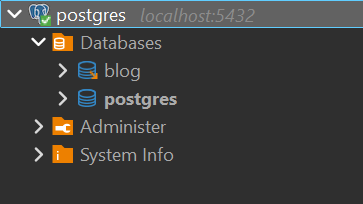
Easiest setup of my life.
Next, let’s define our database schema.
Inside our db folder, we’ll create two new folders: schema and migrations. Inside the schema folder, let’s create our first table definition in posts.sql:
CREATE TABLE posts (
    id               SERIAL PRIMARY KEY,
    title            TEXT NOT NULL,
    content_markdown TEXT NOT NULL,
    content_html     TEXT NOT NULL,
    allow_comments   BOOLEAN NOT NULL DEFAULT TRUE,
    author           TEXT NOT NULL,
    created_at       TIMESTAMPTZ NOT NULL DEFAULT NOW()
);
Next, we’ll need some way of deploying schema changes to our database. We could do this manually of course, but it’s much better to have an automated migration tool in place. Provided that it speaks Postgres, any tool will do the job, but since we’re in the Go ecosystem anyway let’s just go with Goose.
We’ll add the binary to our PATH somewhere and add an .env to the db folder with the required variables that Goose will use:
GOOSE_DBSTRING="host=localhost user=pgroot password=pgpass dbname=blog sslmode=disable"
GOOSE_DRIVER=postgres
GOOSE_MIGRATION_DIR=./migrations
We can then create the first migration file like so:
> goose -s create create_posts_table sql
This creates the file 00001_create_posts_table.sql inside the migrations folder. We then edit this file with the creation script of our first table.
-- +goose Up
-- +goose StatementBegin
CREATE TABLE IF NOT EXISTS posts (
    id               SERIAL PRIMARY KEY,
    title            TEXT NOT NULL,
    content_markdown TEXT NOT NULL,
    content_html     TEXT NOT NULL,
    allow_comments   BOOLEAN NOT NULL DEFAULT TRUE,
    author           TEXT NOT NULL,
    created_at       TIMESTAMPTZ NOT NULL DEFAULT NOW()
);
-- +goose StatementEnd

-- +goose Down
-- +goose StatementBegin
DROP TABLE IF EXISTS posts;
-- +goose StatementEnd
Then, migrating our database is simple:
> goose up
2026/02/09 21:33:01 OK   00001_create_posts_table.sql (14.15ms)
2026/02/09 21:33:01 goose: successfully migrated database to version: 1
And indeed, we can inspect our database in DBeaver to see our new posts table has been created:
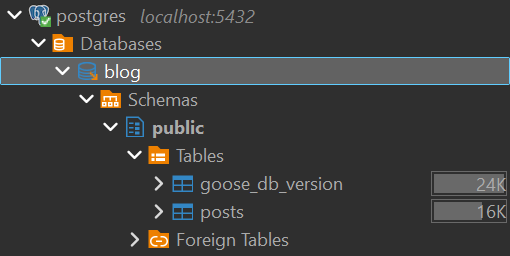
Database connection
The last step for today will be connecting our Go service to our database and serving some posts from the API.
First we’ll need to query our database. We could write all of the code for that ourselves, but a common practice in the world of Go seems to be using sqlc to generate that code for us, so let’s give that a try.
Going back to our posts Go service, we’ll create a file at /internal/database/sqlc/queries.sql with the following contents:
-- name: ListPosts :many
SELECT * FROM posts;

-- name: GetPost :one
SELECT * FROM posts WHERE id = $1;
Next, we’ll create a sqlc.yaml file at the project root:
version: "2"
sql:
  - engine: "postgresql"
    queries: "./internal/database/sqlc/queries.sql"
    schema: "../../db/schema"
    gen:
      go:
        package: "repo"
        out: "./internal/database/sqlc"
        sql_package: "pgx/v5"
        emit_interface: true
        emit_json_tags: true
This file configures sqlc and tells it where to look for our queries, schema, and where to output its generated code. We then simply hit
> sqlc generate
and it will dump several generated files into the specified output directory:
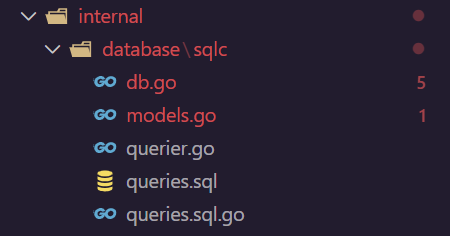
Unfortunately, it appears there’s a few errors. This is because we haven’t actually installed the Postgres package yet that this generated code depends on, so that’s up next. One quick call to
> go get github.com/jackc/pgx/v5
later and we are good to go again.
With this all in place, let’s connect to our database from our Go service. We’ll start by adding the Postgres connection to our application struct:
type application struct {
    config config
    db     *pgx.Conn
}
We’ll then update our main function to initialize our database connection and pass it to the application:
func main() {
    // [...]

    cfg := config{
        addr: ":8080",
        db: dbConfig{
            dsn: configHelper.GetString("DB_DSN", "host=localhost user=pgroot password=pgpass dbname=blog sslmode=disable"),
        },
    }

    conn, err := pgx.Connect(ctx, cfg.db.dsn)
    if err != nil {
        panic(err)
    }
    defer conn.Close(ctx)

    slog.Info("db: connected", "host", conn.Config().Host, "port", conn.Config().Port, "database", conn.Config().Database, "user", conn.Config().User)

    app := application{
        config: cfg,
        db:     conn,
    }

    // [...]
}
The configHelper contains a simple helper function that fetches some variable from the environment and falls back to a default otherwise:
func GetString(key, fallback string) string {
    if value := os.Getenv(key); value != "" {
        return value
    }

    return fallback
}
Now when we start our app, we should see it connect to our database:
> go build -o server.exe .\cmd\ && .\server.exe
time=2026-03-06T21:36:34.937+01:00 level=INFO msg="app: starting"
time=2026-03-06T21:36:34.961+01:00 level=INFO msg="db: connected" host=localhost port=5432 database=blog user=pgroot
time=2026-03-06T21:36:34.961+01:00 level=INFO msg="server: listening" addr=:8080
Almost done…
Our first API endpoints
Let’s finally create some new API endpoints that query our database to retrieve blog posts. We’ll create a folder at /internal/features/posts and within it, two files: service.go and handlers.go.
The service.go file contains our service implementation for retrieving posts from the database. It takes the querier from our generated sqlc code as a dependency.
package posts

import (
    repo "bw/blog-service/posts/internal/database/sqlc"

    "context"
)

type Service interface {
    ListPosts(ctx context.Context) ([]repo.Post, error)
    GetPost(ctx context.Context, id int32) (repo.Post, error)
}

type serviceImpl struct {
    repo repo.Querier
}

func NewService(repo repo.Querier) Service {
    return &serviceImpl{
        repo: repo,
    }
}

func (s *serviceImpl) ListPosts(ctx context.Context) ([]repo.Post, error) {
    return s.repo.ListPosts(ctx)
}

func (s *serviceImpl) GetPost(ctx context.Context, id int32) (repo.Post, error) {
    return s.repo.GetPost(ctx, id)
}
The service currently does little more than passing our requests to the sqlc-generated querier, and returning the sqlc-generated database models as response. I’m not going to bother with it now since this is a toy example, but in case we would want to map this to our own domain models, this would be the place to do it.
Next, the handlers.go file contains the http handler implementations that we’ll register later. It takes the previously defined service interface as a dependency.
package posts

import (
    "bw/blog-service/posts/internal/io"

    "database/sql"
    "errors"
    "log/slog"
    "net/http"
    "strconv"
)

type handler struct {
    service Service
}

func NewHandler(svc Service) *handler {
    return &handler{
        service: svc,
    }
}

func (h *handler) ListPosts(w http.ResponseWriter, r *http.Request) {
    posts, err := h.service.ListPosts(r.Context())
    if err != nil {
        slog.Error("error on service.ListPosts", "error", err)
        io.WriteError(w, err)
        return
    }

    io.WriteJSON(w, http.StatusOK, &posts)
}

func (h *handler) GetPost(w http.ResponseWriter, r *http.Request) {
    idStr := r.PathValue("id")
    id, err := strconv.Atoi(idStr)
    if err != nil {
        io.WriteBadRequest(w, "invalid value for 'id' provided")
        return
    }

    post, err := h.service.GetPost(r.Context(), int32(id))
    if err != nil {
        if errors.Is(err, sql.ErrNoRows) {
            http.NotFound(w, r)
            return
        }

        slog.Error("error on service.GetPost", "error", err, "id", id)
        io.WriteError(w, err)
        return
    }

    io.WriteJSON(w, http.StatusOK, &post)
}
These are the http handlers that will directly handle the incoming requests to our two /posts endpoints. They parse and validate the input requests, call the service layer to retrieve data, and write the outgoing response to the provided response writer.
I’ve also created a few helper functions for writing http responses:
package io

import (
    "encoding/json"
    "net/http"
)

func WriteJSON(w http.ResponseWriter, status int, data any) error {
    w.Header().Set("Content-Type", "application/json")
    w.WriteHeader(status)
    return json.NewEncoder(w).Encode(data)
}

func WriteError(w http.ResponseWriter, err error) {
    http.Error(w, err.Error(), http.StatusInternalServerError)
}

func WriteBadRequest(w http.ResponseWriter, msg string) {
    http.Error(w, msg, http.StatusBadRequest)
}
Finally, we can go back to our service’s init() function, and register these new handlers.
func (app *application) init() http.Handler {
	// [...]

	db := repo.New(app.db)

	postService := posts.NewService(db)
	postHandler := posts.NewHandler(postService)
	mux.HandleFunc("GET /posts", postHandler.ListPosts)
	mux.HandleFunc("GET /posts/{id}", postHandler.GetPost)

	// [...]
}
With this, we have everything in place to query our api.
> curl http://localhost:8080/posts
[{"id":1,"title":"Hello World","content_markdown":"hello world from our new blog api","content_html":"\u003cp\u003ehello world from our new blog api\u003c/p\u003e","allow_comments":true,"author":"bw","created_at":"2026-03-06T21:47:52.622812+01:00"}]
And that’s a good place to take a break for now. In the next post, we’ll set up the microservice for handling comments, and deal with service-to-service calls using gRPC.